Minimum balance report
This report helps you understand how much product needs to be purchased to avoid falling below minimum stock levels.
Conditions for Including Products in the Report
Section titled “Conditions for Including Products in the Report”The report includes only products that meet all of the following conditions:
- Minimum stock control is enabled;
- A minimum stock level is set (value ≥ 0);
- The actual stock level is lower than the minimum stock level.
Report Indicators
Section titled “Report Indicators”- Stock — current product stock level;
- Ordered — quantity of products in open supplier orders that have not yet been received into inventory;
- Minimum Stock — the defined minimum stock level;
- To Purchase — quantity required to restore stock above the critical level;
- Purchase Amount — total amount required to purchase the product at the current cost price;
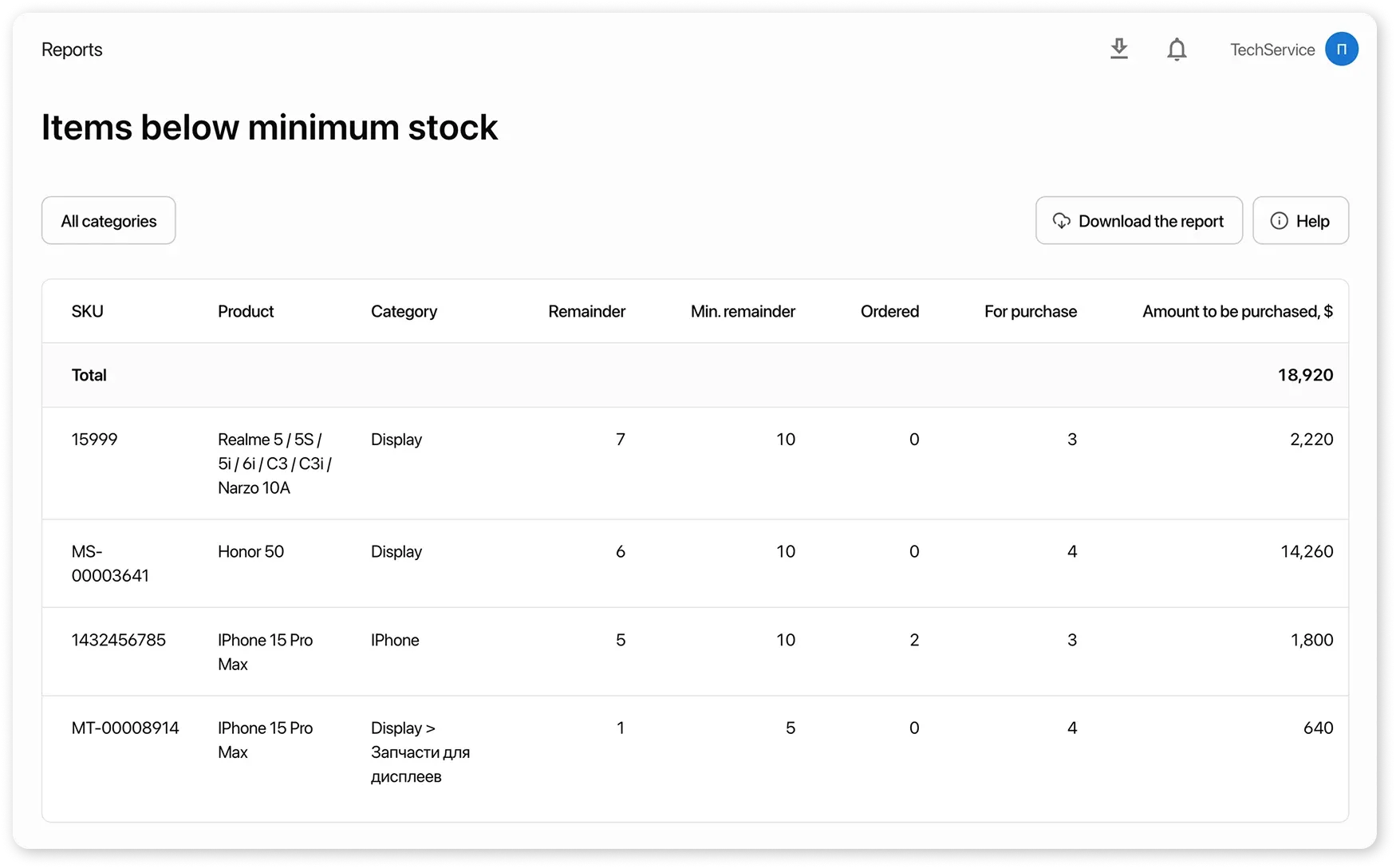
Example:
Section titled “Example:”Product: Protective glass (cost price — 500 $)
- Minimum stock control — enabled
- Minimum stock — 10 pcs
- Actual stock — 4 pcs
Since 4 < 10, the product appears in the report.
Report Filters
Section titled “Report Filters”The following filters are available for convenient analysis and purchase planning:
- by location — view recommendations for a specific location or all locations;
- by category — filter products by category to quickly identify which items require purchasing.